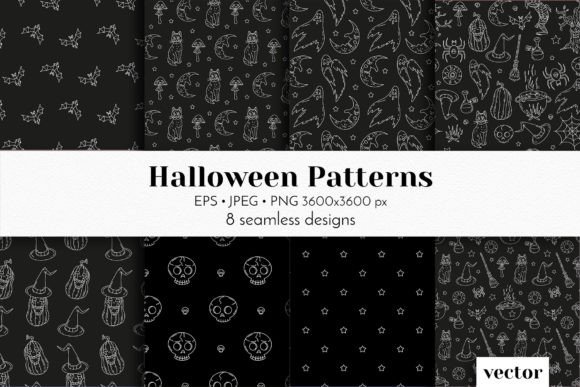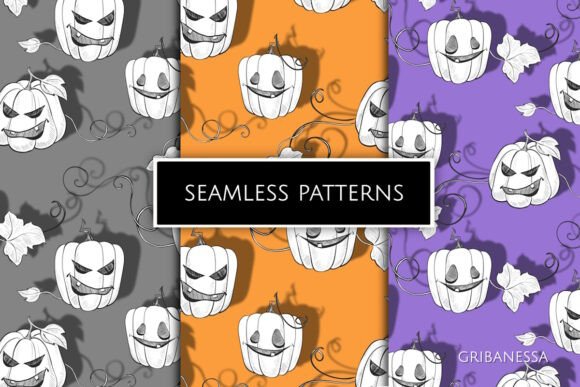
Halloween Vector Seamless Patterns Set
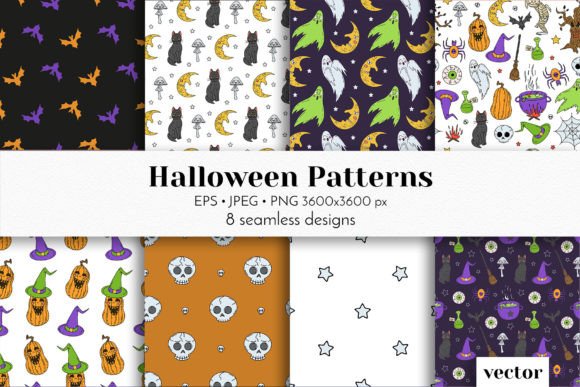
If you're designing Halloween-themed products—whether for a small business, craft project, or client campaign—you’ll want patterns that scale flawlessly, print crisply, and retain charm across formats. The Halloween Vector Seamless Patterns Set delivers exactly that: eight hand-drawn, cute-spooky doodle patterns designed to repeat without visible seams, in formats that suit both digital and physical workflows.
But here’s what many buyers overlook before downloading or applying them: not all “seamless” patterns behave the same way—and not all file types serve your intended use. A mismatch between format and purpose can mean extra editing time, blurry prints, transparency issues on merchandise, or even licensing confusion down the line. Let’s clear up the common missteps—and how to avoid them.
Assuming “Seamless” Means “Plug-and-Play” Across All Tools
“Seamless” refers to how the pattern repeats visually—not whether it integrates instantly into your software or workflow. Some users drop a PNG into Canva or Illustrator expecting automatic tiling, only to find they’ve pasted a single tile instead of a repeating swatch. That leads to awkward gaps, manual duplication, or distorted scaling.
Better approach: Use the EPS10 vector files in Adobe Illustrator or Affinity Designer—they’re built as native swatches and will tile automatically when applied to shapes or artboards. For non-vector tools like Cricut Design Space or Procreate, start with the high-res 3600×3600 PNGs (with transparent background) and enable “repeat” or “pattern fill” functions—if available—or manually offset tiles using guides to preserve alignment.
Overlooking Resolution Needs Based on Output
The set includes JPEG and PNG files at 3600×3600 pixels—a smart choice for most uses—but resolution alone doesn’t guarantee quality. Printing a 12×12-inch scrapbook paper at 300 DPI requires ~3600×3600 pixels, which fits perfectly. But if you’re printing a 40×60-inch banner, that same file may appear pixelated unless upscaled carefully—or better yet, used as a base for vector-based enlargement.
This is where the EPS10 files shine: vectors scale infinitely without loss. So if you’re designing sublimation mugs, tote bags, or fabric yardage, prioritize the EPS versions. Relying solely on raster files for large-format output risks soft edges or jagged lines—especially around delicate doodle elements like tiny bats, candy corn, or ghost outlines.
Misreading File Purpose—Especially Transparency and Backgrounds
The set includes both JPEGs (white background) and PNGs (transparent background). It’s easy to assume either will work interchangeably—but that’s risky. Using a JPEG on a dark website background? You’ll get harsh white boxes around each motif. Using a PNG on a printer that doesn’t handle alpha channels well? You might get unexpected gray halos or clipped edges.
What to check before use: Confirm your end medium’s transparency support. Web designers and app UI creators should default to PNGs. Printers handling CMYK spot-color jobs often prefer flattened JPEGs with intentional white space. And for sublimation on light-colored textiles, PNGs give clean edges; on dark fabrics, you’ll likely need to add a white underbase—which means checking with your printer first.
Underestimating Brand Consistency Across Pattern Variants
Eight patterns sounds generous—until you realize they vary in density, motif size, and visual weight. One might feature tightly packed pumpkins and spiders; another, sparse floating ghosts with generous negative space. Using them side-by-side on packaging or a social media carousel without intention can make your brand feel scattered—not cohesive.
A small business selling Halloween candles, for example, might pair a subtle black-and-orange dot pattern (from the set) with a bolder candy-corn stripe for labels vs. gift tags. That creates hierarchy and rhythm. But slapping all eight patterns across one product line without curation can dilute recognition.
Practical tip: Before committing, open all eight PNGs in one folder and preview them at 25% zoom. Look for consistent line weight, spacing, and color balance. If two feel tonally mismatched (e.g., one whimsical, one slightly grotesque), skip the outlier for branded pieces—even if it’s “cute.” Consistency builds trust faster than variety does.
Skipping Licensing Clarity—Especially for Commercial Use
The set is marketed for branding, gifts, textiles, and sublimation—so commercial use is clearly intended. But always verify the license terms included with your purchase. Some marketplaces bundle extended licenses separately; others include unlimited commercial rights by default. Assuming otherwise could expose you to takedowns or rework later—especially if you’re producing merch for resale or running paid ads featuring the patterns.
Also note: while the patterns themselves are licensed for your use, the *hand-drawn style* isn’t protected. Don’t assume you can trademark a specific arrangement of motifs from the set. Instead, build distinction through your own color palettes, typography pairings, or custom layout treatments.
Forgetting Real-World Application Testing
It’s tempting to judge patterns purely on screen—but lighting, texture, and scale change everything. A delicate spiderweb motif may vanish on brushed cotton fabric but pop on glossy wrapping paper. A high-contrast jack-o’-lantern pattern might overwhelm a minimalist greeting card but energize a kids’ party invitation.
Do this before finalizing: Print a 4×4-inch swatch of each candidate pattern on your actual paper stock—or mock it up digitally using realistic texture overlays. If designing for sublimation, run a test mug or coaster with one pattern first. Small investments in testing prevent costly bulk errors.
Final Thought: Match Format to Function, Not Just Preference
The real value of the Halloween Vector Seamless Patterns Set isn’t just in its cuteness or quantity—it’s in the thoughtful inclusion of multiple formats for distinct roles. JPEGs for quick web previews or email graphics. PNGs for layered digital designs. EPS files for precision scaling and professional print prep.
So before you download, ask: What am I making first? A Shopify product banner? Grab the PNG. Custom fabric for an Etsy shop? Prioritize EPS. Social media story templates? JPEG works fine—but double-check bleed and safe-zone margins. Matching file type to function saves hours, preserves quality, and keeps your Halloween projects feeling polished—not patched together.
When you choose intentionally—and test early—you turn seasonal design from stressful scramble into joyful, scalable creativity.