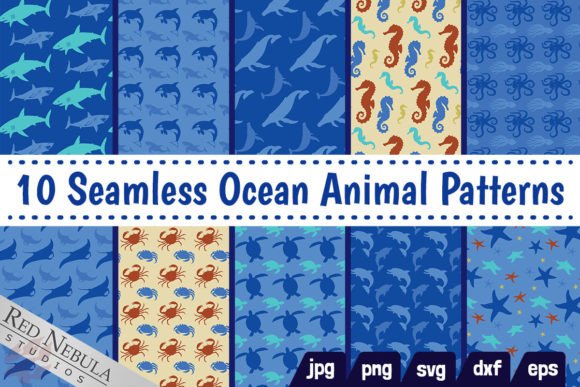
10 Seamless Ocean Animal Patterns
Seamless patterns aren’t just decorative—they’re functional assets that reduce friction in creative and production workflows. The 10 Seamless Ocean Animal Patterns bundle fits precisely where visual consistency, scalability, and cross-platform compatibility matter: from early concepting to final output. It’s not a standalone aesthetic choice; it’s a workflow enabler—designed to slot into existing tools, timelines, and deliverables without rework or compromise.
Where These Patterns Fit in Your Process
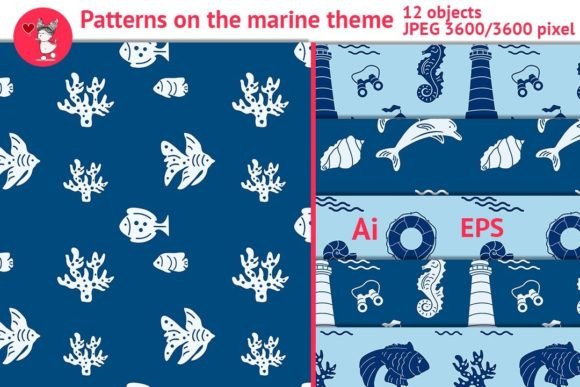
Most designers, marketers, educators, and small business owners juggle multiple platforms—Canva for social posts, Adobe Illustrator for print layouts, Cricut Design Space for physical products, and Shopify for storefronts. The 10 Seamless Ocean Animal Patterns bundle bridges those environments because it ships in native formats for each: SVG for vector editing and cutting machines, EPS for legacy Adobe workflows, DXF for CNC and laser tools, PNG and JPG at 3600px × 3600px (12×12 inches at 300 DPI) for high-res printing, and web-optimized raster files for digital use.
This isn’t about adding another download to your assets folder. It’s about eliminating the need to manually tile, recolor, or rescale patterns mid-project. When you’re prepping a batch of ocean-themed greeting cards, designing a classroom bulletin board, or launching a coastal wellness brand, having ten ready-to-tile, color-coordinated patterns means you skip the “how do I make this repeat evenly?” step—and move straight to layout, messaging, and refinement.
Before the Project: Planning with Purpose
Preparation is where this bundle delivers quiet efficiency. Before opening Photoshop or drafting a product description, review the included animals—dolphins, seahorses, crabs, octopuses, whales, sharks, orcas, manta rays, starfish, and sea turtles—and map them to your project’s tone and audience. A marine biology educator might lead with the seahorse or manta ray pattern for handouts—subtle enough to support text but distinctive enough to reinforce theme. A boutique gift shop owner might pair the coral-accented crab pattern with gold foil stamping on kraft wrapping paper—testing visual cohesion before ordering stock.
Because all ten patterns share a unified palette—shades of blue anchored by sandy gold, coral, and teal—you can mix and match without clashing. That consistency reduces decision fatigue during mood board creation or brand guideline development. No need to adjust hue or saturation across files: they’re calibrated to work together out of the ZIP.
During Execution: Tiling, Adapting, and Integrating
Seamlessness matters most when scaling. Whether you’re tiling across fabric yardage, filling a website hero section, or wrapping a 16-ounce tumbler, the 3600×3600px resolution ensures crisp edges at any size up to 12×12 inches at print quality. In design software, use the pattern swatch feature (Illustrator, Affinity Designer, Figma plugins) or apply as a fill layer—no manual alignment required. For sublimation, the high-DPI JPG/PNG files import cleanly into Sawgrass Print Manager or ChromaBlast software, maintaining edge integrity through heat transfer.
If you’re using Cricut or Silhouette Studio, the SVG and DXF files retain clean vector paths—ideal for layered vinyl decals or engraved wood signs. Unlike raster-only bundles, these formats let you resize infinitely without pixelation, then recolor individual elements if needed (e.g., shifting a whale pattern from navy to teal to match an existing logo).
For educators building interactive PDFs or Google Slides lessons, the PNGs insert directly as slide backgrounds. Their balanced density—neither too busy nor too sparse—keeps text legible while reinforcing thematic context. You don’t need to lower opacity or add overlays; the patterns were designed with readability in mind.
After Delivery: Reuse, Repurpose, Maintain
A well-structured digital asset should age gracefully. The 10 Seamless Ocean Animal Patterns bundle supports long-term use through format redundancy and organizational clarity. All files are named descriptively (dolphin_seamless_pattern_blue_gold.png, orca_seamless_pattern_coral_teal.svg)—no generic “pattern_01.eps” confusion. That saves time when revisiting projects months later or handing off to a contractor.
Small business owners especially benefit from this structure. If you launched a summer collection using the starfish pattern on tote bags and later expand into beach towels, you already have a matching, scalable file—no new licensing, no vendor delays. Likewise, freelancers building templates for clients can embed these patterns into Canva Brand Kits or Adobe CC Libraries, ensuring visual continuity across client assets without repeated sourcing.
Compatibility Notes Worth Keeping Handy
- SVG files open natively in Illustrator, InDesign, Figma, and web browsers—ideal for responsive web backgrounds or embedded illustrations.
- DXF works with Cricut Design Space (via upload), Silhouette Studio (with Basic Edition or higher), and most CAD/CAM software—just verify layer grouping matches your machine’s import preferences.
- PNGs with transparency allow non-rectangular overlays (e.g., placing a seahorse motif over a photo banner without white borders).
- JPGs at 300 DPI meet standard commercial print requirements—no upscaling needed for brochures, posters, or packaging proofs.
Workflow Integration Examples
For bloggers and content creators: Use the whale or turtle pattern as a subtle background for Pinterest pins or Instagram story highlights. Its low-contrast blue tones keep focus on headlines and CTAs—no visual competition.
For makers and crafters: Import the crab or octopus SVG into your cutting software, scale to fit a 4×6 inch coaster blank, and run a single-layer cut. Then sublimate the same pattern onto matching mugs—same file, two SKUs, zero redesign.
For educators and trainers: Combine the coral-accented starfish pattern with editable text boxes in Google Slides to build consistent, themed worksheets. Duplicate the slide master across units—students recognize the visual rhythm, which supports information retention.
For marketers running seasonal campaigns: Apply the shark or orca pattern to email header images, then reuse the same file as a background in Mailchimp’s template builder. Consistency across channels reinforces campaign identity without extra asset creation.
Quality Control & Practical Checks
Before deploying any pattern at scale, do three quick checks: First, zoom to 200% in your editor—verify no visible seams or misaligned edges at the tile boundary. Second, test print a 2×2 inch swatch on your intended substrate (e.g., cotton fabric vs. ceramic mug)—colors shift across materials, and the bundled palette was optimized for broad fidelity, not absolute match. Third, confirm file naming aligns with your team’s asset management system—rename if needed, but preserve the original ZIP for future reference.
These patterns won’t replace thoughtful art direction—but they remove executional roadblocks. You spend less time troubleshooting repeats and more time refining messaging, testing offers, or iterating based on feedback. That’s the real ROI: not just what the patterns look like, but how much smoother your next five projects run because they’re already there—organized, compatible, and ready.