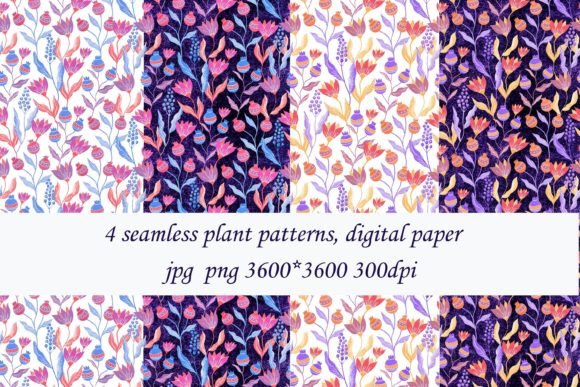
4 Seamless Plant Patterns: Practical Digital Paper for Real Creative Work
If you’re designing packaging, crafting social media templates, building brand assets, or illustrating educational materials, 4 Seamless Plant Patterns gives you clean, versatile, and professionally sized digital paper—ready to tile without visible seams. Each pattern is delivered as a high-resolution 3600 × 3600 pixel file in both JPG and PNG formats, at 300 DPI—ideal for print and scalable digital use. This is a digital download only; no physical items ship, and layout mockups shown online are for demonstration only—not included in your purchase.
What People Often Misunderstand About Seamless Plant Patterns
Many assume “seamless” means “plug-and-play in any software”—but that’s not always true. A pattern may tile perfectly in Photoshop but misalign in Canva or Figma if the canvas size or tiling method isn’t adjusted. Others expect instant visual impact without checking how scale, contrast, or color balance interact with their background or typography. That mismatch can dull your design instead of elevating it.
Another frequent oversight: assuming all 3600 × 3600 files behave the same way across devices and platforms. In reality, some browsers or email clients compress JPGs aggressively, softening fine leaf details or muting greens. PNG preserves transparency and sharpness—but adds larger file sizes, which matters for web performance or email load times. Choosing one format over the other without testing your end-use context can cost time later.
Why Resolution and Dimensions Matter More Than You Think
At 300 DPI and 3600 × 3600 pixels, these patterns support crisp printing up to ~12 × 12 inches—enough for greeting cards, fabric swatches, or small-run stationery. But if you plan to scale beyond that (e.g., for wall decals or large banners), don’t stretch the file. Upscaling degrades clarity, blurs edges, and makes botanical details look muddy. Instead, check whether your design tool supports pattern fills natively—most vector editors (Illustrator, Affinity Designer) and modern raster tools (Photoshop, Photopea) do. Use those features rather than manually duplicating and aligning tiles.
Also note: “3600 × 3600” doesn’t mean the motif itself is centered or evenly distributed. Some plant patterns emphasize dense foliage in one quadrant; others balance open space with repeated stems. Preview thumbnails closely—or better yet, open a sample in your preferred app before committing to a full project. That quick test reveals how the rhythm of leaves, vines, or blossoms flows across your surface.
Avoiding Costly Assumptions When You Buy
One of the most common missteps? Treating seamless patterns like fonts or stock photos—assuming licensing covers *all* uses. These 4 Seamless Plant Patterns are licensed for personal and commercial use, yes—but they’re not meant for resale as standalone clipart, embroidery files, or sub-licensed design assets. If you’re creating a printable planner or selling branded notebooks, you’re covered. If you’re building a design asset marketplace or bundling them into a “pattern toolkit” for others to resell, that requires separate permission.
Another quiet pitfall: skipping color mode checks. RGB works well for screens; CMYK is essential for professional offset printing. These files ship in RGB by default—perfect for web, social, and home printers. But if your printer requests CMYK, convert *after* placing the pattern in your layout (not before), and soft-proof to avoid unexpected shifts in green saturation or stem warmth.
How to Use These Patterns Without Wasting Time
Start simple: apply one pattern as a subtle background layer behind light text—not full-bleed. Try lowering opacity to 5–15% for texture without distraction. For product mockups or blog headers, place the pattern inside a shape (circle, rounded rectangle) using clipping masks. That keeps focus where it belongs while adding organic warmth.
If you're layering multiple patterns (e.g., pairing a fern motif with a trailing ivy), avoid stacking them at full opacity. Instead, vary blend modes—try Multiply for depth or Overlay for subtle contrast. And always save layered versions separately from flattened exports. That way, you can tweak spacing, hue, or scale later without starting over.
What to Verify Before You Download or Deploy
- File integrity: After downloading, open each JPG and PNG in your image viewer. Confirm no corruption, missing corners, or unintended borders.
- Software compatibility: Test tiling in your primary tool—even if it’s just dragging the file into a new document and enabling “pattern fill.” Note whether you need plugins or extensions (e.g., Photoshop’s Pattern Overlay vs. Figma’s Repeat Grid).
- Color fidelity: View on both desktop and mobile screens. Greens and teals often shift between displays. If brand accuracy matters, compare against a known Pantone or HEX reference.
- Usage scope: Double-check your intended application against the license terms. Educators printing classroom handouts? Fine. Agencies embedding into client brand guidelines for third-party use? Also fine—just keep attribution as specified.
Better Choices Start With Small Checks
You don’t need advanced skills to get great results from 4 Seamless Plant Patterns. What helps most is pausing before automation: ask, “Does this pattern support my message—or just fill space?” A delicate eucalyptus repeat might soften a wellness brand; a bold monstera tile could energize a fitness campaign. Let intention—not convenience—guide your choice.
And if something feels off—colors too cool, scale too busy, contrast too flat—don’t force it. These patterns are flexible, but they’re not magic. Sometimes the strongest design decision is using less: one well-placed motif, aligned thoughtfully, says more than four competing layers.
If you’re unsure how a pattern will behave in your specific workflow, reach out before purchasing. I’m happy to clarify technical details, share usage tips, or help troubleshoot a preview. Because great design starts not with perfect assets—but with clear expectations, realistic testing, and the confidence to adjust as you go.